PaddleOCR
PaddleOCR 是业界领先、可直接部署的 OCR 与文档智能引擎,提供从文本识别到文档理解的全流程解决方案
项目背景:识别集装箱号
1 环境配置
当前使用的是虚拟环境:
- python:3.11
- paddlepaddle:3.1
- paddleocr:3.1.0
1.1 安装paddlepaddle
1.2 下载paddleocr
下载网站:https://github.com/PaddlePaddle/PaddleOCR/releases
当前使用的版本是 3.1.0
下载后解压
unzip PaddleOCR-3.1.0.zip
安装依赖
cd PaddleOCR-3.1.0

pip install -r requirements.txt  --user
测试是否能正常运行:
python tools/infer/predict_system.py --image_dir="/workspace/img/" --use_angle_cls=True --use_space_char=True
输出以下内容即成功:
ppocr INFO: not find det model file path None
2 准备数据集
2.1 标注工具
-
PPOcrLabel,专门为 PPOCR 制作的标注工具,推荐。
存在问题:EXE 安装包运行会报错。但是该工具在本地运行标注的话还是比较推荐的。
-
X-AnyLabeling,支持多种导出格式,其中就支持 PPOCR 的格式。
2.2 标注完毕后的数据集
conno/1b4e2845-e9ba-4233-9268-bf07801ace0e.jpg	[{"transcription": "RKSU5020243", "points": [[233, 317], [299, 317], [258, 833], [181, 839]], "difficult": false}]
conno/6ffd244b-1d27-4084-998b-e4d7ac076c5f.jpg	[{"transcription": "ZGXU6173701", "points": [[717, 448], [781, 419], [835, 980], [751, 996]], "difficult": false}]
conno/0ba730a8-052b-4662-88fa-bfd3c7dbd118.jpg	[{"transcription": "WHLU5706937", "points": [[565, 567], [915, 485], [915, 551], [578, 635]], "difficult": false}]
conno/8f50bf55-f825-43ac-87a5-f744aa3c2099.jpg	[{"transcription": "EISU9420010", "points": [[295, 744], [624, 747], [618, 813], [299, 806]], "difficult": false}]
conno/33e22c52-64b6-4715-87d9-d3a7823b97f7.jpg	[{"transcription": "SSKU1302201", "points": [[660, 676], [960, 671], [966, 724], [662, 737]], "difficult": false}]
conno/34a24249-7670-4be2-981f-19c502ee7da2.jpg	[{"transcription": "TKRU4507940", "points": [[660, 395], [724, 395], [717, 882], [619, 902]], "difficult": false}]
conno/67ead2d0-89c0-455c-aef0-49a76a3492aa.jpg	[{"transcription": "待识别", "points": [[585, 415], [589, 415], [593, 501], [917, 341], [893, 263]], "difficult": false}]
conno/78c58cfa-ff0f-4890-9fd9-07a0b639b9ca.jpg	[{"transcription": "LYGU3568255", "points": [[553, 393], [587, 491], [972, 334], [983, 245]], "difficult": false}]
conno/481aee74-f9ce-4145-a8c7-f4c1f45fcc75.jpg	[{"transcription": "RKSU4005584", "points": [[56, 298], [19, 935], [101, 937], [115, 280]], "difficult": false}]
conno/630d6e72-f99d-4922-8886-ea14f9e1a9bd.jpg	[{"transcription": "FCIU2682384", "points": [[562, 737], [572, 803], [867, 712], [858, 655]], "difficult": false}]
conno/9751b358-0b48-4006-8a73-89e816d37b67.jpg	[{"transcription": "CNIU2452605", "points": [[608, 801], [606, 867], [908, 837], [906, 773]], "difficult": false}]
3 准备预训练模型
如果已经有预训练模型的话,可以忽略这一步。
下载地址:https://github.com/PaddlePaddle/PaddleOCR/blob/release/3.1/docs/version3.x/model_list.md
如果报 404 的话,根据 版本 + 路径 进行查找即可。
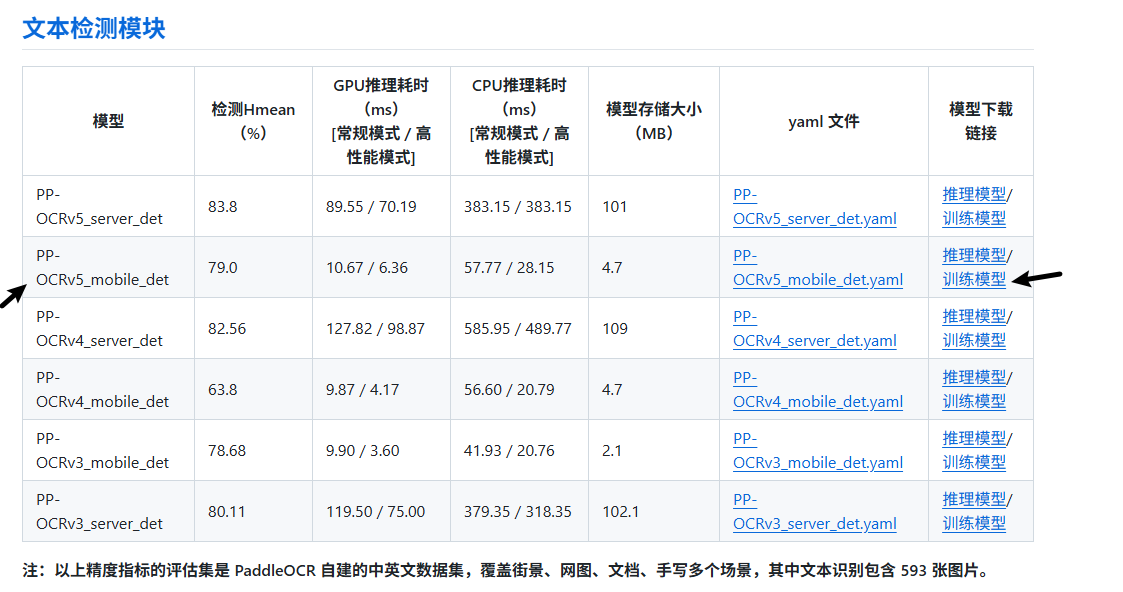
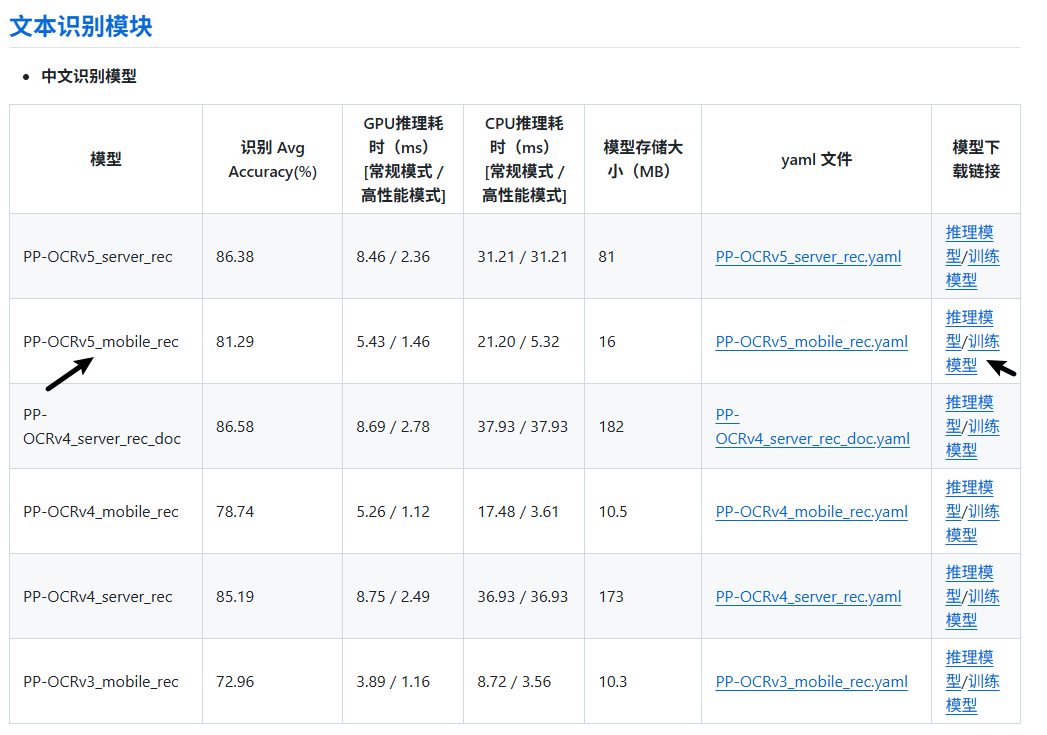
根据情况选择 mobile 和 server 模型
- mobile: 训练速度快,精度较低,识别速度快
- server: 训练速度慢,精度较高,识别速度慢
3.1 文本检测训练模型
3.2 文本识别训练模型
错误情况
ImportError: libGL.so.1: cannot open shared object file: No such file or directory
原因:缺少 libGL.so.1 库
解决方案:
sudo apt update
sudo apt install libgl1-mesa-glx
all input arrays must have the same shap
原因:图像尺寸不一致
解决方案: 将 batch_size_per_card 设置为 1
Eval:
  loader:
    batch_size_per_card: 1
OSError: cannot open resource
原因:字体路径无效
解决方案:将paddleocr里面的字体放到系统字体路径下
cp /workspace/PaddleOCR-3.1.0/doc/fonts/simfang.ttf /usr/share/fonts/